Page 1 of 1

Repainted Hasbro Rodimus Prime

PostPosted: Mon Sep 05, 2011 6:04 pm
by chachipower
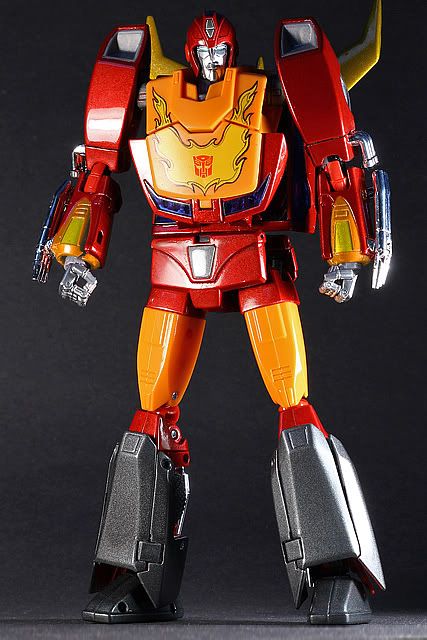
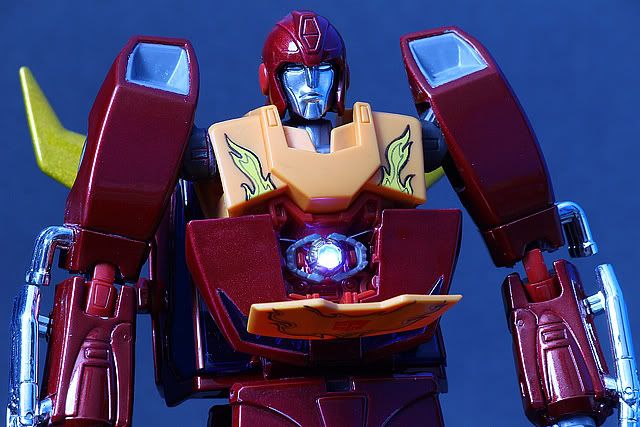
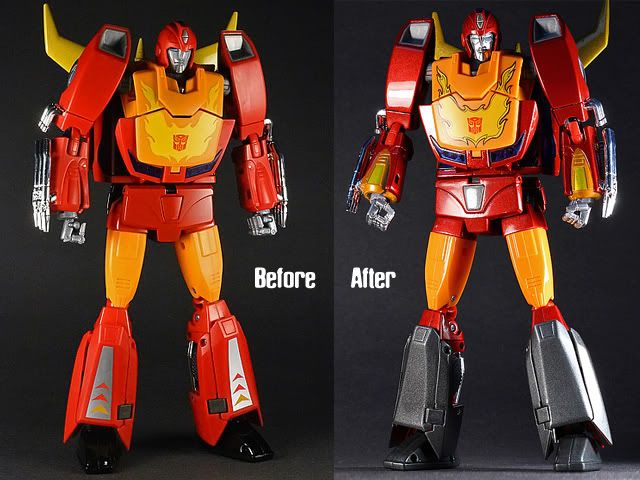
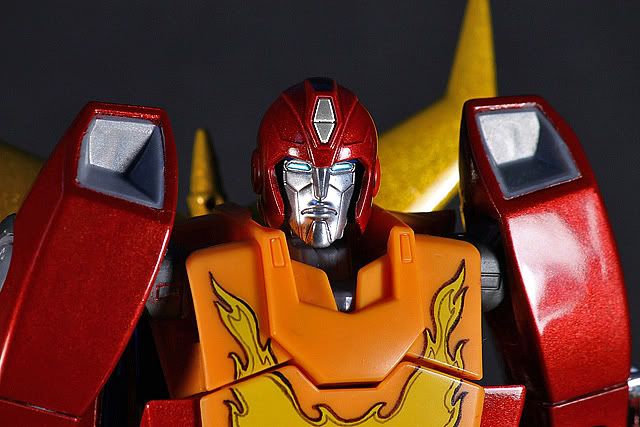
Just wanted to share this with you guys, I was not feeling the plasticky look of either Rodimus Prime version, so I decided to take a chance at painting mine. Lots of painting, wet-sanding and polishing. I used what I learned painting cars to finish it. Still got a few details to finish, like the cockpit and stuff. It's also got a working removeable light-up Matrix. Already thinking about doing a second one although it was tons of labor and time.
Image
Image
Image

Matrix
Image

There's more pictures and info on the build in my blog http://www.rocketpuncharmy.com

Re: Repainted Hasbro Rodimus Prime

PostPosted: Mon Sep 05, 2011 7:28 pm
by Swindle01
looks AMAZING but why did you keeps Hasbros 'Rodimus in Shorts version?' why didnt you just repaint the leg light orange completely like the Superior Takara version?

Re: Repainted Hasbro Rodimus Prime

PostPosted: Mon Sep 05, 2011 8:26 pm
by SKYWARPED_128
The new paint job brings the whole fig to life. Love the shimmery metal flakes in the red paint. And the metal on his face, while it takes away the G1 cartoon look, makes the fig look truly "high end."

Awesome.

Re: Repainted Hasbro Rodimus Prime

PostPosted: Mon Sep 05, 2011 10:28 pm
by chachipower
Swindle01 wrote:looks AMAZING but why did you keeps Hasbros 'Rodimus in Shorts version?' why didnt you just repaint the leg light orange completely like the Superior Takara version?


Thanks I didnt really think about that during painting, wasnt until I was putting it together that I realized those pieces were the shorts, I had this thing torn apart and since it was red I painted it red, Wouldnt be hard at all to do it over though but I think Ill leave it this way, its just a relief to have it almost done now.

Re: Repainted Hasbro Rodimus Prime

PostPosted: Mon Sep 05, 2011 10:32 pm
by chachipower
SKYWARPED_128 wrote:The new paint job brings the whole fig to life. Love the shimmery metal flakes in the red paint. And the metal on his face, while it takes away the G1 cartoon look, makes the fig look truly "high end."

Awesome.

Thanks, I had every intention to keep it movie look, but I didnt find the right shade of metallic red so I took some liberties here and there. I did help it look a bit more high end. I am gonna break out Illustrator to do some new flames I think. Maybe something simpler and with a better Autobot logo.

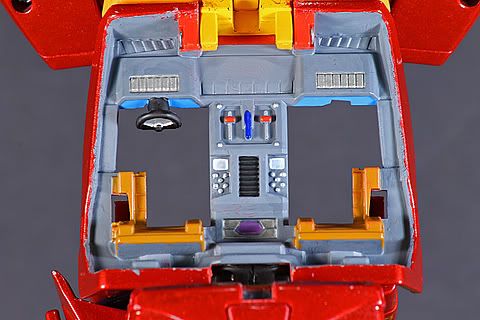
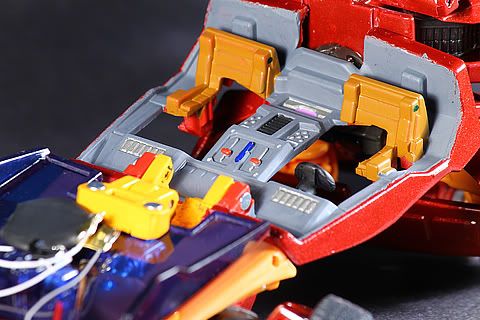
Just did the insides of the leg panels and the cockpit. Did the cockpit in gray with brown seats. I saw that the seats were brown in the movie but I dont recall any clear interior shots so I went with gray

Re: Repainted Hasbro Rodimus Prime

PostPosted: Tue Sep 06, 2011 12:09 am
by SKYWARPED_128
chachipower wrote:
SKYWARPED_128 wrote:The new paint job brings the whole fig to life. Love the shimmery metal flakes in the red paint. And the metal on his face, while it takes away the G1 cartoon look, makes the fig look truly "high end."

Awesome.

Thanks, I had every intention to keep it movie look, but I didnt find the right shade of metallic red so I took some liberties here and there. I did help it look a bit more high end. I am gonna break out Illustrator to do some new flames I think. Maybe something simpler and with a better Autobot logo.

Just did the insides of the leg panels and the cockpit. Did the cockpit in gray with brown seats. I saw that the seats were brown in the movie but I dont recall any clear interior shots so I went with gray


Dude, you've GOT to post some pics of the cockpit soon!

After witnessing such an awesome paint job of the fig, I can't wait see the detailing on the cockpit. It's the tiny details that make a figure lifelike.

Re: Repainted Hasbro Rodimus Prime

PostPosted: Tue Sep 06, 2011 10:56 am
by paul053
Awesome job. :APPLAUSE: Yea, more pictures please. I especially want to see the alt mode.
Re: Repainted Hasbro Rodimus Prime

PostPosted: Tue Sep 06, 2011 3:56 pm
by GunFire Alpha
That paint job is sick! I didn't want MP Rodimus until now :sad:

Re: Repainted Hasbro Rodimus Prime

PostPosted: Tue Sep 06, 2011 9:20 pm
by chachipower
SKYWARPED_128 wrote:
chachipower wrote:
SKYWARPED_128 wrote:The new paint job brings the whole fig to life. Love the shimmery metal flakes in the red paint. And the metal on his face, while it takes away the G1 cartoon look, makes the fig look truly "high end."

Awesome.

Thanks, I had every intention to keep it movie look, but I didnt find the right shade of metallic red so I took some liberties here and there. I did help it look a bit more high end. I am gonna break out Illustrator to do some new flames I think. Maybe something simpler and with a better Autobot logo.

Just did the insides of the leg panels and the cockpit. Did the cockpit in gray with brown seats. I saw that the seats were brown in the movie but I dont recall any clear interior shots so I went with gray


Dude, you've GOT to post some pics of the cockpit soon!

After witnessing such an awesome paint job of the fig, I can't wait see the detailing on the cockpit. It's the tiny details that make a figure lifelike.


Got to work on the cockpit today and it should be dry by now, Im going to go take pics in a second. Let me know what you guys think when I do.

paul053 wrote:Awesome job. :APPLAUSE: Yea, more pictures please. I especially want to see the alt mode.

hmmm alt mode. Ill say this, I've never transformed Rodimus before, so Im not sure if there are parts that rub together. As it is in robot mode, parts hit against each other. Its impossible not to, Im just afraid of messing it up. I have another hasbro Rodimus, maybe Ill practice on that one.

Re: Repainted Hasbro Rodimus Prime

PostPosted: Tue Sep 06, 2011 10:06 pm
by chachipower
Ok, there is still a lot of cleaning up to do in the cockpit, but this is basically what its going to look like.
Image
Image

Re: Repainted Hasbro Rodimus Prime

PostPosted: Thu Sep 08, 2011 3:58 am
by SKYWARPED_128
chachipower wrote:Ok, there is still a lot of cleaning up to do in the cockpit, but this is basically what its going to look like.
Image
Image


Awesome work, Chachipower!

It's got that high-end toy feel while still preserving the look of a G1 toy.

BTW, did you gut the interior or something? It looks "cut up" for some reason.

Re: Repainted Hasbro Rodimus Prime

PostPosted: Thu Sep 08, 2011 12:13 pm
by OMEGAPRIME1983
HOLY CRAPBALLS THAT'S HOT!!!!! Dude, the flames look SICK!!! how did you do those exactly?? Is it a decal maybe?? If it is, I would LOVE to get my hands on a set!!!

Re: Repainted Hasbro Rodimus Prime

PostPosted: Thu Sep 08, 2011 12:59 pm
by chachipower
@Skywarped_128 Thanks, I didn't have to cut anything out of the figure, it is actually like that normally, maybe it looks cut out because the "backpack" isnt showing on the other side, but thats how he is.

OMEGAPRIME1983 wrote:HOLY CRAPBALLS THAT'S HOT!!!!! Dude, the flames look SICK!!! how did you do those exactly?? Is it a decal maybe?? If it is, I would LOVE to get my hands on a set!!!


Wow, thanks, I wasn't feeling the flames to be honest because I did them by hand- sort of. All I did was outline the existing flames with a Gundam Marker and do an inner lining with another Gundam marker that was lighter. I am now thinking of going all out and doing the flames on Illustrator and printing them out on transfer paper and gloss coating over it to preserve it. We'll see how that goes.

Re: Repainted Hasbro Rodimus Prime

PostPosted: Thu Sep 08, 2011 9:50 pm
by OMEGAPRIME1983
oh, see, I thought I had seen a ridge which made me thing they were already transfers (which if you do that I may be interested in a set :grin:), but now that I am looking at it closer, I can see that you just outlined it, and the fact you were able to keep the inner line so perfectly inline with the outer line is just plain killer!! Lastly, are there any alt mode pictures?? I was looking around your site, but I don't remember seeing any..

EDIT: I just realized you said you outlined the existing flame pattern.. which obviously means you did not paint the orangey plastics, which kind of makes me a bit sad, because the thing looks just SO SICK, and the unpainted/only cleared orange plastic makes it look a tad bit off... I'm just saying. Also, mind sharing what kind of paints, and colors you used on this??

Re: Repainted Hasbro Rodimus Prime

PostPosted: Thu Sep 15, 2011 12:38 am
by chachipower
OMEGAPRIME1983 wrote:oh, see, I thought I had seen a ridge which made me thing they were already transfers (which if you do that I may be interested in a set :grin:), but now that I am looking at it closer, I can see that you just outlined it, and the fact you were able to keep the inner line so perfectly inline with the outer line is just plain killer!! Lastly, are there any alt mode pictures?? I was looking around your site, but I don't remember seeing any..

EDIT: I just realized you said you outlined the existing flame pattern.. which obviously means you did not paint the orangey plastics, which kind of makes me a bit sad, because the thing looks just SO SICK, and the unpainted/only cleared orange plastic makes it look a tad bit off... I'm just saying. Also, mind sharing what kind of paints, and colors you used on this??


Weird I thought I had replied to this a few days ago but apparently I didnt. Im not done with the figure, I will eventually gloss over the new flame design when I finish it so it will match the rest of the figure. Alt mode will most likely never happen under my possession because I am afraif to scratch it after all the hours I put into it. I will probably sell it to fund another project and if the new owner wants to transform it, its cool with me.

I used automotive paints. You can use the touch up spray cans and but clear coat of the same brand. Dont expect super gloss results unless you put some elbow grease into it. You might luck out and get super gloss with no dust particles in the paint or you may get orange-peely paint with hairs or bugs in it, if you do, get ready for some wet sanding!

Re: Repainted Hasbro Rodimus Prime

PostPosted: Thu Sep 15, 2011 9:44 pm
by OMEGAPRIME1983
chachipower wrote:
OMEGAPRIME1983 wrote:oh, see, I thought I had seen a ridge which made me thing they were already transfers (which if you do that I may be interested in a set :grin:), but now that I am looking at it closer, I can see that you just outlined it, and the fact you were able to keep the inner line so perfectly inline with the outer line is just plain killer!! Lastly, are there any alt mode pictures?? I was looking around your site, but I don't remember seeing any..

EDIT: I just realized you said you outlined the existing flame pattern.. which obviously means you did not paint the orangey plastics, which kind of makes me a bit sad, because the thing looks just SO SICK, and the unpainted/only cleared orange plastic makes it look a tad bit off... I'm just saying. Also, mind sharing what kind of paints, and colors you used on this??


Weird I thought I had replied to this a few days ago but apparently I didnt. Im not done with the figure, I will eventually gloss over the new flame design when I finish it so it will match the rest of the figure. Alt mode will most likely never happen under my possession because I am afraif to scratch it after all the hours I put into it. I will probably sell it to fund another project and if the new owner wants to transform it, its cool with me.

I used automotive paints. You can use the touch up spray cans and but clear coat of the same brand. Dont expect super gloss results unless you put some elbow grease into it. You might luck out and get super gloss with no dust particles in the paint or you may get orange-peely paint with hairs or bugs in it, if you do, get ready for some wet sanding!


Oh trust me, I know the elbow-grease needed.. I use auto paints on my customs as well ;)